Pages

Showing posts with label PAN-OS. Show all posts

Sunday, January 4, 2026

PAN-OS release plan

Happy New Year 2026.

It has been some time I wanted to write that post about the PAN-OS software release strategy.

Until PAN-OS 10.2

Each supported PAN-OS version released a maintenance release every 2-3 months.

And unless, there was some critical bug passing through QA tests, there was not so many hotfix releases.

To illustrate that, you can check the number of bug fixed in the releases for PAN-OS 9.1.

["version","Nb fixes"],
['9.1.0', 8],
['9.1.1', 21],
['9.1.2', 89],
['9.1.3', 130],
['9.1.4', 72],
['9.1.5', 96],
['9.1.6', 69],
['9.1.7', 60],
['9.1.8', 74],
['9.1.9', 56],
['9.1.10', 110],
['9.1.11', 104],
['9.1.12', 90],
['9.1.13', 36],
['9.1.14', 26],
['9.1.15', 38],
['9.1.16', 50],
['9.1.17', 20],
['9.1.18', 12],
['9.1.19', 3],

In the list above (dumped from the release notes I saved for PAN-OS 9.1), I ignored the hotfix releases.
But you can see each maintenance release received more than 50 fixes until 9.1.13 then it decreased to be less than 50 fixes.
--> if you are still on PAN-OS 9.1, you can consider than after 9.1.13, the version is quite mature now as there are less software issues addressed.

So what has changed since PAN-OS 10.2?

"Service pack" release

["version","Nb fixes"],
['11.1.0', 11],
['11.1.1', 12],
['11.1.2', 16],
['11.1.3', 130],
['11.1.4', 17],
['11.1.5', 312],
['11.1.6', 52],
['11.1.7', 25],
['11.1.8', 246],
['11.1.9', 53],
['11.1.10', 29],
['11.1.11', 247],
['11.1.12', 41],
['11.1.13', 34],
This is the list of the regular maintenance releases.
If you look carefully the number of fixes. You can noticed there are some "service pack" releases : 11.1.5 with 312 fixes, 11.1.8 with 246 fixes and 11.1.11 with 247 fixes. While the other maintenance releases contain up to 50 fixes.

More Hotfix releases

["version","Nb fixes"],
['11.1.0-h1', 1],
['11.1.2-h1', 4],
['11.1.2-h3', 1],
['11.1.3-h1', 2],
['11.1.4-h1', 9],
['11.1.4-h4', 56],
['11.1.4-h9', 47],
['11.1.4-h13', 69],
['11.1.4-h15', 12],
['11.1.4-h16', 1],
['11.1.4-h17', 23],
['11.1.4-h18', 7],
['11.1.4-h25', 14],
['11.1.4-h27', 6],
['11.1.5-h1', 1],
['11.1.6-h1', 61],
['11.1.6-h3', 12],
['11.1.6-h4', 16],
['11.1.6-h5', 1],
['11.1.6-h6', 33],
['11.1.6-h7', 22],
['11.1.6-h10', 48],
['11.1.6-h14', 66],
['11.1.6-h17', 55],
['11.1.6-h19', 17],
['11.1.6-h20', 15],
['11.1.6-h21', 10],
['11.1.6-h22', 1],
['11.1.6-h23', 24],
['11.1.7-h1', 1],
['11.1.7-h2', 137],
['11.1.10-h1', 57],
['11.1.10-h4', 70],
['11.1.10-h5', 27],
['11.1.10-h7', 65],
['11.1.10-h9', 1],
['11.1.10-h10', 32],
With the new release plan, there is also more hotfix releases now.
Keep in mind the PAN-OS releases are still cumulative: 11.1.8 contains all the issues resolved since 11.1.0 until 11.1.8.

Sunday, December 28, 2025

Home PA-450 upgraded to PAN-OS 11.2

My home PA-450 was running on PAN-OS 11.1 since I received it.

Now that PAN-OS 11.2 has reached its 11th release (11.2.0 is the first one, as the date of writing, the last release available is 11.2.10), I think it was time for me to do the move to PAN-OS 11.2.

Among the list of the new features introduced in PAN-OS 11.2, not much for my use case (internet gateway), but I made sure to enable the inline ML inspection.

So far, so good (less than 24h uptime), I am posting this post behind my firewall :)


Sunday, August 13, 2023

More than a contributor on PANCast

Have you heard of Palo Alto Networks' PANCast?

It is a podcast made by TAC engineers (me included) to Palo Alto Networks products users.
Not a sale oriented stuff, really focused on the technology, and how to use 110% capabilities of the products.

The podcast covers all possible topics : from basic troubleshooting tools by TAC to protection of your containers with Azure Container Registry (Prisma Cloud) or discussing the informations you can find in your Cortex XDR logs.

So far, I did an episode on Panorama and its capabilities as logging solution. And we have some episodes pending to be published. I know that because I am scheduling the releases of the episodes :p

So stay tuned.

Sunday, December 20, 2020

Packet Capture on PAN-OS

When you need to troubleshoot issues on the firewall, you will end with a packet capture if you did not solve it earlier with other checks.

To perform the packet capture on PAN-OS :
- define the filter
To define the traffic you want to capture. The purpose of the filter is to focus the capture on the relevant packets, and to save resources on the firewall.
- define the capture stage
The firewall capture packets in different stages : receive -  transmit - firewall - drop

The WebUI access is enough to define those 2 steps for most cases.

You will need the CLI for the following cases :
- the firewall has the hardware offloading, the traffic will hit the dataplane CPU only at the session setup, then it will be offloaded. Doing a capture with the traffic offload enabled will give the impression of lost packets (packets are missing).
In this case, you will need to disable the offloading so all the packets captured
set session offload no
- you want to have a subnet as a filter
It is not possible to define a subnet in the WebUI.
You have access to the keyword source-netmask and destination-netmask keywords for the filter definition.
For instance, the command below set a filter to match TCP traffic from 1.1.1.0/24
debug dataplane packet-diag set filter match source 1.1.1.0 source-netmask 255.255.255.0 protocol 6

- you want to see in real time the packets captured.
To check the filter configured is matching some traffic.
view-pcap follow yes

- you wish to capture specific packets only.

For reference, you can find the different protocol code from the protocol list on the IANA website

Sunday, December 13, 2020

Get a GlobalProtect with a trusted SSL certificate for free

During the COVID-19 time, most of the workers have to work remotely (when they can). 

GlobalProtect is the name of the remote users VPN solution included in PAN-OS. It tooks less than 20 min to set up a basic VPN to allow users to work from home. 

I am just going to show how to set up a deployment with a free domain name and a legitimate SSL certificate.

1 - the domain name

Register a .tk domain on freenom.com
It is free, you only need to renew the registration every year.

Once you  have your domain, you can create an A record to point to your firewall's public IP address.

2- the SSL certificate

To get a free certificate trusted by most systems, we will take advantage of the letsencrypt project.

You need to run certbot in manual mode on a machine with Internet access.
You will use the DNS challenge, once you have the challenge, create the record on freenom accordingly.

Once it is done, you will get the certificate on the machine.

You will need to upload the private key and the associated certificate to the firewall and configure the GlobalProtect to use this certificate.

Sunday, November 29, 2020

Event-driven actions on PAN-OS device

You know EEM from Cisco and you want something similar on PAN-OS.
It is possible (at least for simple actions).

I wrote a KB article about how to be alerted when there is a version mismatch between HA pairs. That show a way to : perform an action (send an alarm) based on an event (system logs about the version mismatch).

In this post, I will uncover a way to perform some actions directly on PAN-OS based an event.

Note : the event need to be logged on a forwardable logs (one of the logs accessible on the Monitor tab).
We cannot prepare event for systems logs on mp-logs for instance.

On PAN-OS, in the log settings, we can define as destination :
- Panorama/CDL
- SYSLOG servers
- EMAIL server
- SNMP Traps
- HTTP server
We cannot customize what is send to Panorama/CDL, but we can customize the SYSLOG/EMAIL/SNMP Traps/HTTP requests generated when a log generated (so by definition, when there is an event).

Let's focus on the HTTP request possibilities.
We can for instance send the log to a twitter account for instance or ... we can take advantage of the PAN-OS XML API interface.

So, events + HTTP server + XML API on the firewall = Event-driven actions

So how do we do that?

step 1 : find the log, you will use. The log need to be relevant and unique for the event (don't select a log which come every day, unless it is your wish)

step 2 : get the API key
https://docs.paloaltonetworks.com/pan-os/9-0/pan-os-panorama-api/get-started-with-the-pan-os-xml-api/get-your-api-key.html

step 3 : create the HTTP server profile.

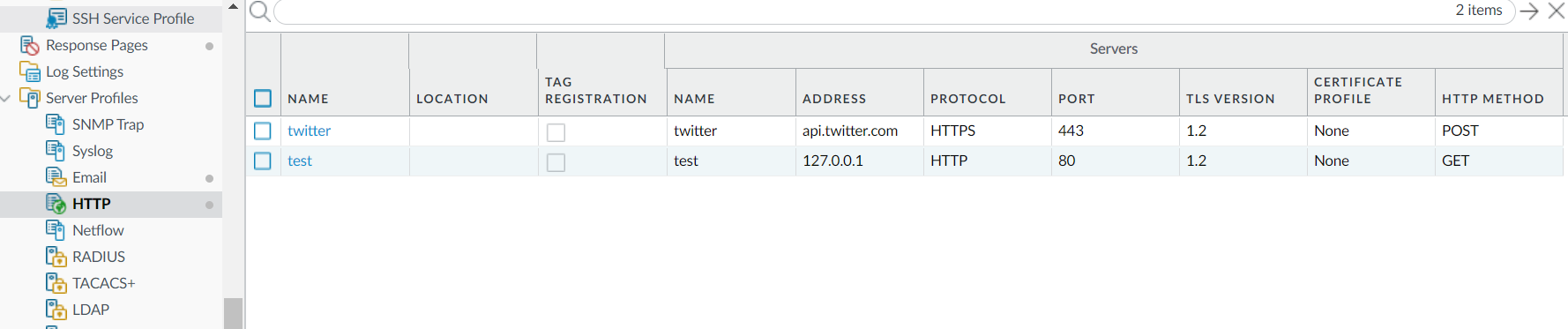
In the picture above, I created the profile test. You notice the IP address is 127.0.0.1 (the firewall itself) and the protocol used is HTTP and not HTTPS. As the request will not leave the firewall, it is not an issue. And finally, it is a GET request being sent.

step 4 : customize the payload format of the log type you are working on. 
The main things to note in the picture above are:
- the URI format : it is simply /api/ (this will be appended to the server defined in step 3)
- in Parameters : you will put the different parameters to send to the firewall, the key to use is the key you have generaed in step 2. In this picture, I use the type "op", so you will need to define the "cmd" parameter accordingly.
- the payload is empty, and it is not important for us as everything we need is in te GET request (the URL itself).

step 5 : bind the event with the HTTP profile
In this picture, you can see I am sending an email and I perform the action defined in step 4 when there is any log matching the filter (cmd eq commit), so when there is a commit on the firewall.

step 6 : commit and that's it.


update 01-Dec : in the server profile, the address need to be localhost and not 127.0.0.1

Sunday, September 20, 2020

My contributions to the PANW Knowledge Base.

The purpose of this article is list the published articles to the PANW Knowledge Base.

Only the publicly available articles will be listed.

How To Be Alerted for Version Mismatches Between HA Peers 
This article shows how to use the filter the events to create specific alerts, with a simple use case : "version mismatch between HA peers". 
By adapting the filter, you can set alerts for different events.

How to use one Template stack for a high availability Firewall Pair on Panorama.
This articles explains how to use the variables in order to manage multiple devices using one template.

Where to find the current preferred software versions? (PAN-OS, GlobalProtect, User-ID Agent, Plugins)

Cannot replace device on Panorama

GlobalProtect Agent on Linux CentOS cannot connect to GlobalProtect Gateway

UDP sessions stuck after failover
An use case of the post about the event-driven actions on PAN-OS devices

Sunday, November 3, 2019

Administrator rules for your PANW firewalls (work in progress)

Will you let your kids play with your gun? I hope not.
With your firewall, I think you should do the same.

Letting the firewall managed by people who don't know exactly what they are doing, and the risks implied because of the applied configuration can be catastrophic in case of breach : it is like having a lock on your door, but leaving the door opened; do not get surprised if something bad happens then.

Sunday, October 13, 2019

Password recovery on PAN-OS firewall

If you forgot your domain account you used to log on your favorite PAN-OS systems, you simply have to reset it from the domain controller (or the equivalent).

But how to recover the local account password?

To do so, there are multiple ways to recover it.

1 - High Availability
In the case the firewall is in HA with another firewall, if you can access the peer firewall, you can create a new local account, and then sync the config.

2- Panorama
In case the firewall is added to Panorama, it is possible to connect from Panorama then select the firewall to display the firewall.
You can also add a new account on a template, and push the template to the firewall.

3- Maintenance mode
It is possible to restore a previous configuration (you need to need the password on the previous configuration).
You can also export the configuration, edit the configuration then load it with a new password.
Finally, you can factory reset (last resort solution)

Finally, I advise you to set a read-only account with a password which can expire : if you have lost the superuser password, and you don't want to factory reset the firewall, the TAC will be able to do something using this read-only account.
And while you cannot configure the firewall, you still can see the logs and reports.