Pages

Sunday, January 4, 2026

PAN-OS release plan

Happy New Year 2026.

It has been some time I wanted to write that post about the PAN-OS software release strategy.

Until PAN-OS 10.2

Each supported PAN-OS version released a maintenance release every 2-3 months.

And unless, there was some critical bug passing through QA tests, there was not so many hotfix releases.

To illustrate that, you can check the number of bug fixed in the releases for PAN-OS 9.1.

["version","Nb fixes"],
['9.1.0', 8],
['9.1.1', 21],
['9.1.2', 89],
['9.1.3', 130],
['9.1.4', 72],
['9.1.5', 96],
['9.1.6', 69],
['9.1.7', 60],
['9.1.8', 74],
['9.1.9', 56],
['9.1.10', 110],
['9.1.11', 104],
['9.1.12', 90],
['9.1.13', 36],
['9.1.14', 26],
['9.1.15', 38],
['9.1.16', 50],
['9.1.17', 20],
['9.1.18', 12],
['9.1.19', 3],

In the list above (dumped from the release notes I saved for PAN-OS 9.1), I ignored the hotfix releases.
But you can see each maintenance release received more than 50 fixes until 9.1.13 then it decreased to be less than 50 fixes.
--> if you are still on PAN-OS 9.1, you can consider than after 9.1.13, the version is quite mature now as there are less software issues addressed.

So what has changed since PAN-OS 10.2?

"Service pack" release

["version","Nb fixes"],
['11.1.0', 11],
['11.1.1', 12],
['11.1.2', 16],
['11.1.3', 130],
['11.1.4', 17],
['11.1.5', 312],
['11.1.6', 52],
['11.1.7', 25],
['11.1.8', 246],
['11.1.9', 53],
['11.1.10', 29],
['11.1.11', 247],
['11.1.12', 41],
['11.1.13', 34],
This is the list of the regular maintenance releases.
If you look carefully the number of fixes. You can noticed there are some "service pack" releases : 11.1.5 with 312 fixes, 11.1.8 with 246 fixes and 11.1.11 with 247 fixes. While the other maintenance releases contain up to 50 fixes.

More Hotfix releases

["version","Nb fixes"],
['11.1.0-h1', 1],
['11.1.2-h1', 4],
['11.1.2-h3', 1],
['11.1.3-h1', 2],
['11.1.4-h1', 9],
['11.1.4-h4', 56],
['11.1.4-h9', 47],
['11.1.4-h13', 69],
['11.1.4-h15', 12],
['11.1.4-h16', 1],
['11.1.4-h17', 23],
['11.1.4-h18', 7],
['11.1.4-h25', 14],
['11.1.4-h27', 6],
['11.1.5-h1', 1],
['11.1.6-h1', 61],
['11.1.6-h3', 12],
['11.1.6-h4', 16],
['11.1.6-h5', 1],
['11.1.6-h6', 33],
['11.1.6-h7', 22],
['11.1.6-h10', 48],
['11.1.6-h14', 66],
['11.1.6-h17', 55],
['11.1.6-h19', 17],
['11.1.6-h20', 15],
['11.1.6-h21', 10],
['11.1.6-h22', 1],
['11.1.6-h23', 24],
['11.1.7-h1', 1],
['11.1.7-h2', 137],
['11.1.10-h1', 57],
['11.1.10-h4', 70],
['11.1.10-h5', 27],
['11.1.10-h7', 65],
['11.1.10-h9', 1],
['11.1.10-h10', 32],
With the new release plan, there is also more hotfix releases now.
Keep in mind the PAN-OS releases are still cumulative: 11.1.8 contains all the issues resolved since 11.1.0 until 11.1.8.

Sunday, December 28, 2025

Home PA-450 upgraded to PAN-OS 11.2

My home PA-450 was running on PAN-OS 11.1 since I received it.

Now that PAN-OS 11.2 has reached its 11th release (11.2.0 is the first one, as the date of writing, the last release available is 11.2.10), I think it was time for me to do the move to PAN-OS 11.2.

Among the list of the new features introduced in PAN-OS 11.2, not much for my use case (internet gateway), but I made sure to enable the inline ML inspection.

So far, so good (less than 24h uptime), I am posting this post behind my firewall :)


Sunday, December 14, 2025

Palo Alto Networks Network Security Architect ... Passed

Palo Alto Networks has reworked their certification program to be more "role" based.

You can find all the new certifications here.

So you have a track for each main Palo Alto Networks products portfolio:
- Security Operation oriented with Cortex products
- Cloud Security oriented with Prisma Cloud products
- Network Security oriented with Strata products

I took the NetSec NGFW Engineer and the NetSec Analyst, which were more or less covering the PCNSE (Palo Alto Networks certified Networks Security Engineer) earlier this year.

So I wanted to test the NetSec Architect exam, released last October (announcement here).

... and I got a PASS.
Although during the exam, I was not confident until the last question.

This exam is totally different than the NetSec NGFW Engineer and Analyst, it is more "design" oriented in my opinion. Also, a simple NGFW day to day job would not be enough: an understanding of the big picture of the SASE architecture, and how every product fits into this architecture is required.

For the preparation ... just my day to day work in TAC, which let's me honest lack of Prisma Access / Prisma SDWAN experience. 
Positive point: I attended a workshop on Prisma AIRS - runtime protection, the exam requires the candidate to understand the use case of Prisma AIRS vs AI Access, and it helped me in the exam.

Anyway, if I have to prepare it correctly, I would say you need a correct understanding of the different technologies involved in SASE.

Sunday, January 14, 2024

Linkedin "top computer networking voice" badge

This week, I saw I got on my LinkedIn profile the "top computer networking voice" badge.


Is it an achievement?
Actually not really, to get the badge you simply need to answer/comment the automatically generated answers about a question (which is also probably automatically generated).
Of course, you need to answer with relevant answers (to get the comment "liked") but not really rocket science.

Now about this new badge stuff, I was wondering if it was not part of the AI on going trend, Linkedin is part of Microsoft, Microsoft has a partnership with OpenAI (developping ChatGPT) ... and there was this video.


At 0:58, the slide shows the "training pipeline" to get a AI assistant.

So like I wrote earlier, you have automatically generated answers from AI, and you get some human answer, use the how the answers are relevant (based on the number of likes) and use the best answers to improve the train the AI (ChatpGPT).

So the badge is more token for participating in helping the AI to provide better answers than an actual proof of "expertise" as anyone with a LinkedIn ccount could answer.

Anyway, that's always good for my ego.

Sunday, December 31, 2023

Use Hostname to deduce running services

Disclaimer : the information in this article have been disclosed to my current company's Patent Committee in December 2023, but they took the decision not to pursue further with it, nor to keep it as Trade Secret, so this idea remains as a simple idea.
Therefore, I will simply disclose it here, I thought it was a good idea, maybe some people can see some interesting use case of it.
Also, as of today, I am not aware of any product / product feature that is using the idea.

So to understand the idea, let's start with some basics.

We talk about 'semantic' when we are talking about the meaning of a word.

In Computing and more specifically in Networking, this goes up to the bit level : 0 / 1 are distinct value, and they have a meaning (is / is no; true / false). So a bit alone may have a meaning, as a set of bits together.

For instance, the flags in the TCP header.

  TCP Header Format

                                    
    0                   1                   2                   3   
    0 1 2 3 4 5 6 7 8 9 0 1 2 3 4 5 6 7 8 9 0 1 2 3 4 5 6 7 8 9 0 1 
   +-+-+-+-+-+-+-+-+-+-+-+-+-+-+-+-+-+-+-+-+-+-+-+-+-+-+-+-+-+-+-+-+
   |          Source Port          |       Destination Port        |
   +-+-+-+-+-+-+-+-+-+-+-+-+-+-+-+-+-+-+-+-+-+-+-+-+-+-+-+-+-+-+-+-+
   |                        Sequence Number                        |
   +-+-+-+-+-+-+-+-+-+-+-+-+-+-+-+-+-+-+-+-+-+-+-+-+-+-+-+-+-+-+-+-+
   |                    Acknowledgment Number                      |
   +-+-+-+-+-+-+-+-+-+-+-+-+-+-+-+-+-+-+-+-+-+-+-+-+-+-+-+-+-+-+-+-+
   |  Data |           |U|A|P|R|S|F|                               |
   | Offset| Reserved  |R|C|S|S|Y|I|            Window             |
   |       |           |G|K|H|T|N|N|                               |
   +-+-+-+-+-+-+-+-+-+-+-+-+-+-+-+-+-+-+-+-+-+-+-+-+-+-+-+-+-+-+-+-+
   |           Checksum            |         Urgent Pointer        |
   +-+-+-+-+-+-+-+-+-+-+-+-+-+-+-+-+-+-+-+-+-+-+-+-+-+-+-+-+-+-+-+-+
   |                    Options                    |    Padding    |
   +-+-+-+-+-+-+-+-+-+-+-+-+-+-+-+-+-+-+-+-+-+-+-+-+-+-+-+-+-+-+-+-+
   |                             data                              |
   +-+-+-+-+-+-+-+-+-+-+-+-+-+-+-+-+-+-+-+-+-+-+-+-+-+-+-+-+-+-+-+-+

                            TCP Header Format

          Note that one tick mark represents one bit position.

                               Figure 3. (from RFC 793)
For instance, the flag SYN when set to 1, mean the segment is the first segment sent by the host, and more important the sequence number in the header is the starting sequence number.
Another illustration of this semantic: the MAC address, and more specifically the first half of it. Those 3 bytes identify a specific vendor.
Last example I want to discuss in this post, is the IP address. You may have heard of the IP addressing, and with it, you may have some rules : for instance, in a network range, the first available address will be the gateway IP address, the 2nd one is for the active gateway (as a device), and the 3rd one is for the passive gateway (again as a device).
Basically:
x.x.x.1 for the default gateway
x.x.x.2 for the active node
x.x.x.3 for the passive node
All the 3 points are examples of semantic in Networking.
Now, there is a feature on PAN-OS which is allowing users to have some policies based on the IP Semantic : IP Wildcard Objects
The wildcard objects will match IPs meeting the wildcard object condition.
The idea I propose is about the hostname. All objects are defined with a hostname (simpler than to remember the IP address of every machine running on the network). Most of the time, the hostmame is defined following a naming convention, so if you can determine the naming convention or at least identify some key portion in the hostname to link to a running service, that can be saved for other purposes.
So by analysing a firewall configuration:
- we can get some mapping of hostname <-> security rules, for instance you have a security rule to allow dns request to the object "fr-dns-1".
- and by doing for a lot of configuration files, you can then get some trends on hostname portion <-> applications. For instance, when you collect 1000 security rules for DNS traffic to different hostnames, it will appear some characters may be common in most of the hostnames (for instance "dns" in a hostname may indicate the server runs DNS server).
So when some trends (hosntame part which are common for most of the security rule for the same application)  are identified for every application, it is then possible to have consumer services which could benefit from it:
- An AI-Copilot for configuration assistance ("Make a security rule to strictly allow only DNS application to the DNS servers")
- configuration audit, making sure that for all the hostnames found in a configuration, only the required applications are allowed.
- intelligence capabilities, if you collect all the A records, the applications running for all records can be returned. 

Monday, December 25, 2023

Lessons learnt from COVID-19

I think this will be one of the major health disaster of the 21th century. It has shows that in our hyperconnected world, it would not be difficult to spread a virus.

No need of a some people (activist or terrorits) to spread it, as shown in the movie "12 Monkeys".

We just need a virus with a long incubation time to allow people with no symptoms to travel before being sick...

Anyway, let's get back to the topic of this post, the lessons learnt from this period.

1 - Appreciate simple things
Being confined at home gives you time to appreciate things you would not noticed in the "pre-COVID" lifestyle.

2 - Keep contacts with relatives, friends, colleagues.
Also, it was not possible to physically meet, you can message/call or do a visio to discuss. It is different, but it is better than being totally in lockdown.

3 - Do not keep in the same location, positive cases and negative cases
Unless you want the positive cases to contamine the negative ones. It is like having zombies in a building with non contaminated people ...if you watched World War Z, you have a lot of times this situation, like that one
Or for IT people, it is like leaving a compromised machine with a worm in the production network waiting all the machines get infected.

4 - Believe in a cure.
Eventually, scientists will find a cure.
Multiple vaccins are going to be released.

Sunday, August 13, 2023

More than a contributor on PANCast

Have you heard of Palo Alto Networks' PANCast?

It is a podcast made by TAC engineers (me included) to Palo Alto Networks products users.
Not a sale oriented stuff, really focused on the technology, and how to use 110% capabilities of the products.

The podcast covers all possible topics : from basic troubleshooting tools by TAC to protection of your containers with Azure Container Registry (Prisma Cloud) or discussing the informations you can find in your Cortex XDR logs.

So far, I did an episode on Panorama and its capabilities as logging solution. And we have some episodes pending to be published. I know that because I am scheduling the releases of the episodes :p

So stay tuned.

Patent granted

In case you are not following me on LinkedIn, I guess you are not aware the patent application done on March 2021 has ended, and the patent has been granted officially on 31 January 2023.

The patent details can be found here.

As you will see the patent owner is Palo Alto Networks, as I disclosed my invention to my employer in their patent program.
The invention is directly something PAN-OS can benefit in order to secure communiations, and the technical issue addressed by the invention is addressed in the PAN-OS feature App-ID Cloud Engine.
(Disclaimer : I am not aware if Palo Alto Networks has or has not use the invention)

So how big achievement is it?
1- Before Palo Alto Networks decided or not to apply for a patent, you need to convince a Patent Committe of your invention, the challenge addressed by the invention.
I submitted few others ideas and they were rejected.

2- I am the first inventor (through the Patent Progam of the company) in APAC region.

3- I am also the first one working in Palo Alto Networks TAC.

Sunday, June 4, 2023

Google - access to job application information

In 2011, when I was a fresh young graduate, I did some interviews for a network engineer role in Dublin.

Obviously, I did not make it.

I found recently that Google has a data access policy for the candidates (you can find it here). So I sent a mail to see what data was available after so many years.

It turns out, they did found the information about me : CV, different applications, and interview feedback.

Although it is a bit creepy to keep those data after so much time (Is there no retention period for those information?) , I found that those feedback were interesting : you do not see the questions asked / the interviewer, but you have the answers I provided and the feedback of the interviewer to the question / to the interview.

And today, I can safely say, that my application for the same role would end probably with the same outcome : rejected.

Conclusion : HR/recruiters, if you can spent 5min to provide feedback, do it.

Sunday, December 20, 2020

Packet Capture on PAN-OS

When you need to troubleshoot issues on the firewall, you will end with a packet capture if you did not solve it earlier with other checks.

To perform the packet capture on PAN-OS :
- define the filter
To define the traffic you want to capture. The purpose of the filter is to focus the capture on the relevant packets, and to save resources on the firewall.
- define the capture stage
The firewall capture packets in different stages : receive -  transmit - firewall - drop

The WebUI access is enough to define those 2 steps for most cases.

You will need the CLI for the following cases :
- the firewall has the hardware offloading, the traffic will hit the dataplane CPU only at the session setup, then it will be offloaded. Doing a capture with the traffic offload enabled will give the impression of lost packets (packets are missing).
In this case, you will need to disable the offloading so all the packets captured
set session offload no
- you want to have a subnet as a filter
It is not possible to define a subnet in the WebUI.
You have access to the keyword source-netmask and destination-netmask keywords for the filter definition.
For instance, the command below set a filter to match TCP traffic from 1.1.1.0/24
debug dataplane packet-diag set filter match source 1.1.1.0 source-netmask 255.255.255.0 protocol 6

- you want to see in real time the packets captured.
To check the filter configured is matching some traffic.
view-pcap follow yes

- you wish to capture specific packets only.

For reference, you can find the different protocol code from the protocol list on the IANA website

Sunday, December 13, 2020

Get a GlobalProtect with a trusted SSL certificate for free

During the COVID-19 time, most of the workers have to work remotely (when they can). 

GlobalProtect is the name of the remote users VPN solution included in PAN-OS. It tooks less than 20 min to set up a basic VPN to allow users to work from home. 

I am just going to show how to set up a deployment with a free domain name and a legitimate SSL certificate.

1 - the domain name

Register a .tk domain on freenom.com
It is free, you only need to renew the registration every year.

Once you  have your domain, you can create an A record to point to your firewall's public IP address.

2- the SSL certificate

To get a free certificate trusted by most systems, we will take advantage of the letsencrypt project.

You need to run certbot in manual mode on a machine with Internet access.
You will use the DNS challenge, once you have the challenge, create the record on freenom accordingly.

Once it is done, you will get the certificate on the machine.

You will need to upload the private key and the associated certificate to the firewall and configure the GlobalProtect to use this certificate.

Sunday, December 6, 2020

On IOS 14, get the Personal Hotspot option

I moved to an IOS device recently and I noticed that there was no option to enable the Personal Options.
My device has been updated on 14.2.1 and still nothing.

The Apple Support provided this documentation but does not state the issue on IOS 14.
But it seems multiple users are impacted.

I just succeeded in unlocking the Personal Hotspot on my phone.

So to enable the Personal Hotspot (if it is missing) :
Go to Settings > Mobile Data > Mobile Data Network.
Scroll down and you will see the section "Personal Hotspot".

Just type a password in Password.
When you go back, you will see the Personal Hotspot appears.

Somehow, I feel like the system is waiting a password to be defined (initiate a salt in the system - unique string set by the user itself - Apple has no control on it), so the Personal Hotspot can be enabled.

My thoughts about the CISSP exam

Last month, I took the CISSP exam and I got an unexpected result : I passed.

By "unexpected", I mean I was expecting to have 150 questions, and the exam ended by itself after I submitted the 100th questions.

My notes for those preparing this exam:

- take you time to answer to the questions
It does not worth the risk to rush out the exams and failed it.
Better to take the time to answer to each question carefully and get the positive outcome after 100 questions, than rushing out thinking it will take 150 questions, and get a negative outcome after 100 questions.
When the exam ended for me, it remained about 50min for the 50 questions...

- for technical profiles, focus on the theorical and processes points
You have the weight of each domain available on ISC2 website (it will change next year by the way). And although the textbook I used (official study guide from Sybex) discussed about practical examples, most of the questions were theorical (just question checking the understanding of a notion definition) or processes oriented.
I advise you to write down while you're studying the different processes seen, the inputs/actors/expected outcomes/objectives of each process, it position related to other processes... Something I did not do, but I think it is more interesting than some cheatsheets I found online which contains just keywords and brief explanations.

- schedule the time to set a deadline
I had to take 2 exams during the past 3 months, and for technical reason I had to reschedule one. This change the study planning for the CISSP. When you study for the exam, you keep the knownledge in your short term memory, it means you need to take the exam when you still have this knowledge. It does not mean you don't have the knownledge in your long term memory, just that the amount of data will not be the same (on PAN-OS, it is like detailled traffic logs and summary traffic logs, the short term memory is like the traffic logs, detailled but covering short amount of time compared to the summary traffic logs, aggregations of traffic logs (information lost) covering larger period of time).

- don't waste your time on "silly" points
On one of my questions, I felt there was a mispelled word on a word which affect the asnwer of the question. At the end, the answer I selected was not related to this mispelled word, as another word in the question was the main point of the question.
Just note the mispelled word with the question ID and give it at the end of the exam to the proctor.

Resources used:

- the Sybex - CISSP official study guide, it is great for people who cannot sleep at night.

- the videos on LinkedIn learning from Chapple (one of the author of the official study guide), I advise to watch the video after finishing the book to refresh the memory. (you can pass the first 5min of each video where Chapple is selling the book).

- CISSP cheatsheets, see my comments above.

For me, I an currently in the endorsement process, so certification in process.

And good luck for those taking the exam.

Sunday, November 29, 2020

Event-driven actions on PAN-OS device

You know EEM from Cisco and you want something similar on PAN-OS.
It is possible (at least for simple actions).

I wrote a KB article about how to be alerted when there is a version mismatch between HA pairs. That show a way to : perform an action (send an alarm) based on an event (system logs about the version mismatch).

In this post, I will uncover a way to perform some actions directly on PAN-OS based an event.

Note : the event need to be logged on a forwardable logs (one of the logs accessible on the Monitor tab).
We cannot prepare event for systems logs on mp-logs for instance.

On PAN-OS, in the log settings, we can define as destination :
- Panorama/CDL
- SYSLOG servers
- EMAIL server
- SNMP Traps
- HTTP server
We cannot customize what is send to Panorama/CDL, but we can customize the SYSLOG/EMAIL/SNMP Traps/HTTP requests generated when a log generated (so by definition, when there is an event).

Let's focus on the HTTP request possibilities.
We can for instance send the log to a twitter account for instance or ... we can take advantage of the PAN-OS XML API interface.

So, events + HTTP server + XML API on the firewall = Event-driven actions

So how do we do that?

step 1 : find the log, you will use. The log need to be relevant and unique for the event (don't select a log which come every day, unless it is your wish)

step 2 : get the API key
https://docs.paloaltonetworks.com/pan-os/9-0/pan-os-panorama-api/get-started-with-the-pan-os-xml-api/get-your-api-key.html

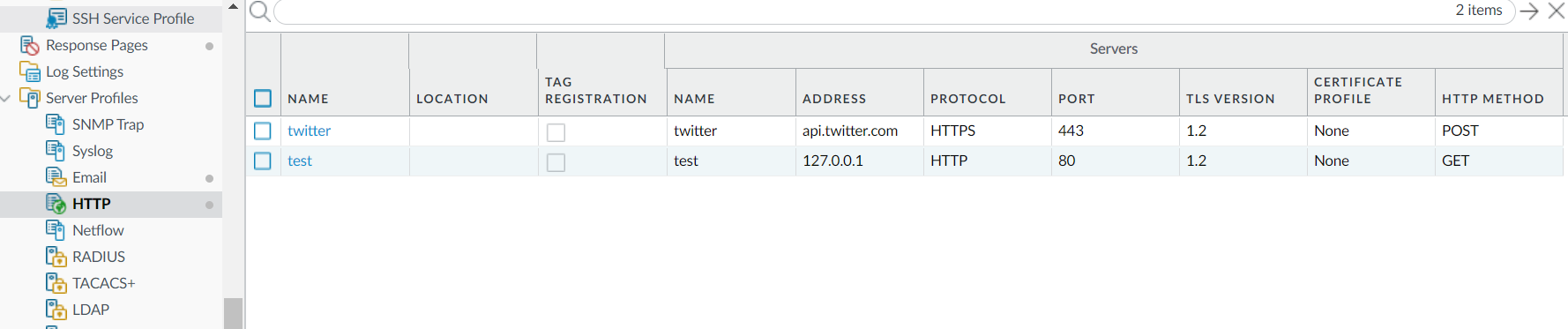
step 3 : create the HTTP server profile.

In the picture above, I created the profile test. You notice the IP address is 127.0.0.1 (the firewall itself) and the protocol used is HTTP and not HTTPS. As the request will not leave the firewall, it is not an issue. And finally, it is a GET request being sent.

step 4 : customize the payload format of the log type you are working on. 
The main things to note in the picture above are:
- the URI format : it is simply /api/ (this will be appended to the server defined in step 3)
- in Parameters : you will put the different parameters to send to the firewall, the key to use is the key you have generaed in step 2. In this picture, I use the type "op", so you will need to define the "cmd" parameter accordingly.
- the payload is empty, and it is not important for us as everything we need is in te GET request (the URL itself).

step 5 : bind the event with the HTTP profile
In this picture, you can see I am sending an email and I perform the action defined in step 4 when there is any log matching the filter (cmd eq commit), so when there is a commit on the firewall.

step 6 : commit and that's it.


update 01-Dec : in the server profile, the address need to be localhost and not 127.0.0.1

Sunday, September 20, 2020

My contributions to the PANW Knowledge Base.

The purpose of this article is list the published articles to the PANW Knowledge Base.

Only the publicly available articles will be listed.

How To Be Alerted for Version Mismatches Between HA Peers 
This article shows how to use the filter the events to create specific alerts, with a simple use case : "version mismatch between HA peers". 
By adapting the filter, you can set alerts for different events.

How to use one Template stack for a high availability Firewall Pair on Panorama.
This articles explains how to use the variables in order to manage multiple devices using one template.

Where to find the current preferred software versions? (PAN-OS, GlobalProtect, User-ID Agent, Plugins)

Cannot replace device on Panorama

GlobalProtect Agent on Linux CentOS cannot connect to GlobalProtect Gateway

UDP sessions stuck after failover
An use case of the post about the event-driven actions on PAN-OS devices

Sunday, January 26, 2020

3E au Vietnam

Ca faisait un petit moment deja que je voulais ecrire un billet afin de faire un retour d'experience de la methode '3E' utilisee lorsque j'etais au Vietnam.

Cette methode repose sur 3 axes :
- Education
- Exposure
- Experience

1- Education
Il faut s'assurer que les membres de l'equipe savent un minimum de procedures propres a nos differents clients.
Pour cela, un wiki a ete mis en place contenant les differents procedures propres a chaque client. Des article de type "How to" ont ete ecris.
A la fin a cause du nombre croissant de procedure a connaitre, j'ai fait un petit quizz dont le but etait de tester le savoir-faire.

2- Exposure
Un mentoring etait en place de telle sorte qu'un nouvel arrivant etait avec une personne avec une certaine experience sur le client.
Le but est de permettre a chacun : de transmettre et de poser directement des questions hors de cadre formel.

3- Experience
Lire des procedures, discuter avec son mentor c'est bien, mais on apprends plus vite en appliquant ce que l'on apprends. Des que la personne est en confiance, et qu'elle se sent prete a aller au feu, elle pouvait commencer a prendre des tickets.

A ces 3 points, j'ajoute Enpowerment.
Chaque membre de l'equipe est responsabilise : elle peut, et elle est encourage a ecrire du contenu dans le wiki. Toute l'equipe est consulte afin de savoir s'il y a des points en particulier a remonter au client.

Sunday, November 3, 2019

Administrator rules for your PANW firewalls (work in progress)

Will you let your kids play with your gun? I hope not.
With your firewall, I think you should do the same.

Letting the firewall managed by people who don't know exactly what they are doing, and the risks implied because of the applied configuration can be catastrophic in case of breach : it is like having a lock on your door, but leaving the door opened; do not get surprised if something bad happens then.

Sunday, October 13, 2019

Password recovery on PAN-OS firewall

If you forgot your domain account you used to log on your favorite PAN-OS systems, you simply have to reset it from the domain controller (or the equivalent).

But how to recover the local account password?

To do so, there are multiple ways to recover it.

1 - High Availability
In the case the firewall is in HA with another firewall, if you can access the peer firewall, you can create a new local account, and then sync the config.

2- Panorama
In case the firewall is added to Panorama, it is possible to connect from Panorama then select the firewall to display the firewall.
You can also add a new account on a template, and push the template to the firewall.

3- Maintenance mode
It is possible to restore a previous configuration (you need to need the password on the previous configuration).
You can also export the configuration, edit the configuration then load it with a new password.
Finally, you can factory reset (last resort solution)

Finally, I advise you to set a read-only account with a password which can expire : if you have lost the superuser password, and you don't want to factory reset the firewall, the TAC will be able to do something using this read-only account.
And while you cannot configure the firewall, you still can see the logs and reports.


Saturday, October 5, 2019

Windows Update - liste des URLs

Pour les utlisateurs de PAN-OS, il est possible de faire une regle de securite pour autoriser l'application "ms-update" (la signature applicative qui correspond a Windows Update).

L'avantage d'App-ID est que le firewall ne se focalise plus seulement sur les informations de couche 3 (adresse IP) et 4 (ports utilises); le firewall va aussi chercher des marqueurs au niveau des couches superieures (par exemple le SNI).

La regle la plus simple est de simplement autorise l'application. Le firewall va laisser passer les flux reconnus comme "ms-update" vers toutes les destinations.
"MicrosoftUpdate; index: x" {
        from trust;
        source any;
        source-region none;
        to untrust;
        destination any;
        destination-region none;
        user any;
        category any;
        application/service [0:ssl/tcp/any/443 1:ms-update/tcp/any/80 2:ms-update/tcp/any/443 3:ms-update/tcp/any/8530 4:ms-update/tcp/any/8531 ];
        application/service(implicit) [0:web-browsing/tcp/any/80 1:web-browsing/tcp/any/443 2:web-browsing/tcp/any/8530 3:web-browsing/tcp/any/8531 ];
        action allow;
        icmp-unreachable: no
        terminal yes;
}

Ce n'est pas forcement la meilleure des choses : imaginons un traffic reconnu comme "ms-update" alors que ce n'est pas le cas, le pare-feu laissera passer le traffic vers cette destination.

Une facon de restreinte l'autorisation de "ms-update" via une URL category. Le pare-feu autorisera alors les flux corespondant a l'application qui corresponds aux URLs dans l'URL category.

J'ai mis une liste (qui sera amene a evoluer dans le temps) des URLs utilisees par Windows Update.
C'est par ici (github)

Il suffit simplement ensuite de creer une nouvelle URL categorie et d'y importer la liste.
Ensuite, il suffit de modifier la regle de securite.

"MicrosoftUpdate; index: x" {
        from trust;
        source any;
        source-region none;
>        to untrust;
        destination any;
        destination-region none;
        user any;
        category "Microsoft update";
        application/service [0:ssl/tcp/any/443 1:ms-update/tcp/any/80 2:ms-update/tcp/any/443 3:ms-update/tcp/any/8530 4:ms-update/tcp/any/8531 ];
        application/service(implicit) [0:web-browsing/tcp/any/80 1:web-browsing/tcp/any/443 2:web-browsing/tcp/any/8530 3:web-browsing/tcp/any/8531 ];
        action allow;
        icmp-unreachable: no
        terminal yes;
}

Saturday, September 21, 2019

IT Problème ... Magic Cable

Solution du IT Problème "ping impossible".

Comme l'a dit Christophe en commentaire, il suffisait tout simplement de faire un ping en explicitant le nom de la VRF sur R1 : ping vrf CUST 192.168.0.1.
En effet, l'interface est configurée en étant membre de la VRF CUST. Donc elle n'est plus dans le contexte global du routeur. Il est d'ailleurs possible de vérifier cela en tapant un show ip route sur R1, on voit que le réseau n'est plus sur le routeur (ce que j'appelle contexte global), par contre un show ip route vrf CUST permet de voir l'existence de la route sur la vrf CUST.

J'en profite aussi pour dire que la solution Cisco EVN (Easy Virtual Network) facilite la gestion des VRFs. En effet, il suffira alors de se mettre dans la VRF CUST (via routing-context vrf CUST), puis de taper ping 192.168.0.1 pour faire un ping dans la VRF CUST.